
Jev vs LLMs, Thinking Fast and Slow
Quick, what’s 2 + 2?
Now, what’s 17 × 24?
You didn’t have to work the first one out. The answer was just there. The second one was different. You probably slowed down, maybe even reached for a calculator. (It’s 408. You’re welcome.)
Now imagine a coworker who pulls out a calculator for 2 + 2 as well. Every single time.
That’s roughly how we build AI agents today. While an agent works, it keeps asking itself small questions. Does this ticket have enough detail? Does this change need a review? Am I stuck in a loop? Each of those goes to a big LLM that could easily do 17 × 24, and each time, we wait.
I wanted to know if those small questions really need a big model, and that’s how I ended up trying Jev. To explain what Jev does, though, I first need to borrow an idea from a book.
The 2 + 2 and 17 × 24 examples come from Daniel Kahneman’s Thinking, Fast and Slow. Kahneman says we have two ways of thinking, which he calls System 1 and System 2.
System 1 is fast and automatic. It’s what recognises an angry face, or answers 2 + 2 before you’ve even decided to. It runs all the time and keeps suggesting answers.
System 2 is slow and takes effort. It’s what you use to fill in a tax form, or to work out 17 × 24. Its second job is keeping an eye on System 1. System 1 keeps offering quick answers and impulses, and System 2 decides whether to go along with them. Most of the time it does, without checking very hard, because checking takes effort. That’s why Kahneman calls it lazy. It only really takes over when it has to, like when System 1 has no answer (17 × 24), when something surprises you (a cat that barks), or when you need to hold yourself back (staying polite when you’re angry).
Kahneman is talking about people, but the idea works surprisingly well for software if you keep it simple. Here’s the version I’ll use in this post. A System 1 question is one where the answer follows directly from what you’re looking at. “Is this ticket about billing?” is one. You read the ticket, and you know. A System 2 question needs you to work something out first, and then use that result to get the next one. 17 × 24 is like that. You do 17 × 20, then 17 × 4, then add them up.
That’s the only difference that matters here. It has nothing to do with how big or expensive the model is. (I borrowed this way of putting it from a video that calls it “one look vs many”.)
One small warning. Kahneman himself calls the two systems “fictitious characters”, not real parts of the brain, and some studies in his book haven’t held up well. So think of all this as a metaphor. It just happens to be a useful one.
OUR AI TREATS 2 + 2 LIKE 17 × 24
“Don’t default to an LLM.” (OpenAI’s own latency guide)
Let’s stay with that coworker for a moment. Pulling out a calculator for 2 + 2 is slow, but at least the answer is right. A calculator is only wrong when you are. An LLM can manage that all by itself. The easiest way to see this is to build one of those small checks ourselves.
Say we want to know if a bug report has steps to reproduce. The obvious way is to ask an LLM. (The code in this post is pseudocode, so it should read fine whatever language you use.)
answer = ask_llm(
  model      = "Claude Sonnet 5",
  max_tokens = 50,
  prompt     = "Does this bug report include steps to reproduce?
                Answer true or false." + ticket
)
It works, and we get true back. Problem solved?
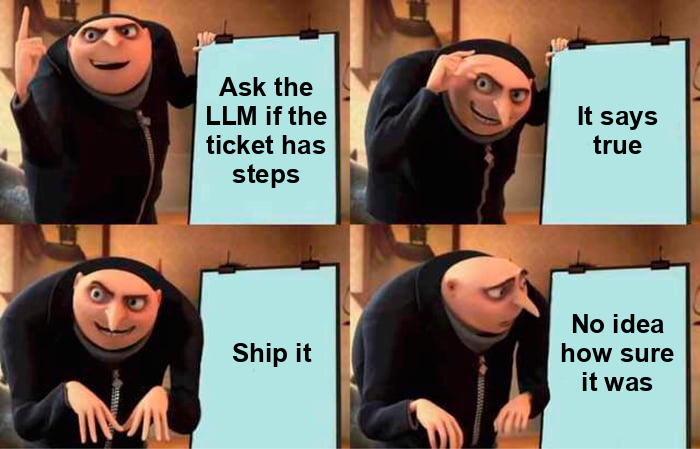
Not quite. We’ve got an answer, but look at what we didn’t get.
Unlike a calculator, an LLM can be wrong, and it won’t tell you how sure it is. We get true, but no idea how confident the model was. By default, the reply is just the answer, with no number saying how likely it is to be right. We could ask the model to add how sure it is, like “true, 90% sure”. The trouble is, researchers found that models almost always say 80 to 100%, even when they’re wrong. So the number doesn’t tell you much.
Picking up the calculator takes time. The answer is one word, but the round trip isn’t. One study measured Claude Haiku 4.5 at about a second per call (981 ms median), just for intent detection, and an agent makes these calls constantly.
Sometimes it does long division for 2 + 2. On Claude 5 models, thinking is on by default. So our yes/no question might be quietly reasoning its way to the answer and billing us for it, and those hidden tokens can even use up the limit of 50 tokens before the answer arrives.
The long division is easy to fix. You can switch thinking off, or turn the effort down, for small checks. The other two aren’t so easy. With an LLM, you still pay for a full round trip, and you still don’t know how sure it is. What we really want for 2 + 2 questions is a quick answer that also tells us how much to trust it. That’s what Jev tries to be.
MEET JEV
“No text generation, no parsing.” (TypeSafe docs)
Jev comes from a company called TypeSafe AI, and it went into early access on 15 September 2026. TypeSafe calls it the first “System One model” and says it was inspired by Kahneman. So the metaphor isn’t mine. It’s on the label.
Jev doesn’t write text like an LLM does. You give it some input, which TypeSafe calls the state (for us, that’s the ticket), plus a few questions about it. The state can be plain text or a JSON object, so you can pass the ticket’s fields as they are. Jev checks every question against the state in one go, gives back an answer to each with a probability, and your code takes it from there.
flowchart LR
    S["state<br/>(the ticket)"] --> J["Jev<br/>one call"]
    Q["questions"] --> J
    J --> A["an answer to each question<br/>+ probabilities"]
    A --> C["your code<br/>decides what to do"]
The questions come in three types.
| Type | Use it for | You get back |
|---|---|---|
| Choice | Pick one label | the label, plus a probability for each option |
| Score | Place it on a scale (2 to 10 levels) | a score, plus probabilities |
| Noul | Yes / no. Yes, it’s really called Noul | the probability of yes |
Here’s our ticket check again, this time for Jev. Extra questions barely change the response time, so I’ve added a couple more. TypeSafe calls this speculative fan out. You ask everything you might need in one go, even questions whose answers you may end up ignoring, and let your code decide what’s relevant.
answers = jev.ask(
  model = "Jev 1.13.0",      // pin the exact version, since a new one can shift the probabilities
  state = ticket,
  questions = {
    hasSteps   = Noul("Does the ticket include steps to reproduce the bug?")
    stepsClear = Noul("Are the steps specific enough for someone else to follow?")
    area       = Choice("Which part of the product is this about?",
                        [billing, login, search, other])
    severity   = Score("How bad is this for the user?",
                       ["Cosmetic (looks wrong, still works)",
                        "Annoying (works with a workaround)",
                        "Blocking (can't continue)"])
  }
)

answers.hasSteps   →  0.91       (probability of yes)
answers.area       →  "billing"  (plus a probability for each option)
answers.severity   →  1.2        (0 = Cosmetic … 2 = Blocking)
There’s no reply to parse, because every answer comes back already typed. All four questions are answered at once, in a single call. The pricing is unusual too. It’s $0.042 per million input tokens, and output is free. You pay mostly for the ticket, and it’s only sent once, so you might as well ask everything in the same call. In one of TypeSafe’s own tests, asking 13 questions about a long article in one call was about 12× cheaper than asking them one at a time, and the answers came out the same.
Why the probability matters
The probability is the most interesting part of Jev, and a famous puzzle from Kahneman’s book shows why. It comes from Shane Frederick’s Cognitive Reflection Test, and it goes like this.
A bat and a ball cost $1.10 in total. The bat costs $1.00 more than the ball. How much does the ball cost?
A lot of people’s first answer is 10 cents. The right answer is 5. The interesting part is what Frederick found when he asked people to guess how many others would solve it. People who answered 10 cents guessed 92%. People who got it right guessed only 62%. The people who were wrong thought the problem was easier.
That’s the big warning about System 1. Feeling sure doesn’t mean you’re right. And a feeling can’t be measured, so you can’t tell when it’s leading you astray.
LLMs have a similar problem, and part of it comes from how they’re trained. Chat LLMs are usually tuned with RLHF, which teaches a model to say things people prefer. That works for chat, but TypeSafe’s AI primer points out that it can also reward flattery, and made up answers that sound confident. Jev is trained a different way, which TypeSafe calls RLCD. It returns decisions and calibrated probabilities instead of text.
flowchart LR
    P["pretrained<br/>model"] --> H["RLHF<br/>answers people prefer"] --> C["chat LLMs<br/>(with or without reasoning)"]
    P --> D["RLCD<br/>calibrated decisions"] --> J["Jev"]
Remember the people who got the bat and ball wrong? They felt more sure than the people who got it right. Jev is trained to do the opposite. When it’s likely to be wrong, its number should drop. TypeSafe calls these “epistemically honest probabilities”. That’s what makes the number useful. You can act on a 0.95, and double check a 0.6. And unlike a feeling, you can test it on your own tickets before you trust it.
There’s one thing to watch out for, though. Choice and Score answers also have a confidence field. It’s a single number that tells you how strongly the probabilities point at one answer, and TypeSafe suggests using it to decide when to act and when to ask a person. But it isn’t the chance that the answer is right. In TypeSafe’s own demo with three options, which uses a simplified formula, a top probability of 0.8 gives a confidence of just 0.7.
WHEN IS A QUESTION 2 + 2?
Fast answers with probabilities sound great, but only if you ask the right questions. So how do you know which of your checks Jev can take over?
Go back to the definition from earlier. “Is this ticket about billing?” is 2 + 2, because the answer is right there in the ticket. Now compare it with “Who approves this refund, following our four delegation rules?” It sounds just as simple, but it isn’t. You have to work out the first approver before you can find the second, and so on. That’s 17 × 24, and it’s a job for normal code, or for a model that can think it through.
The video I mentioned earlier tested exactly this, and the code and results are public. Each question gave the model a shuffled list of facts like “Tia is Mo’s manager”, then asked who is N managers above a given person. Jev answered as a Choice, picking one name from the list. Another model, Qwen, answered the same questions twice, once with thinking turned off and once with it on.
With one step, everyone got every question right. With more steps, the two setups that had to answer straight away fell apart. Jev dropped to 20% at four steps and 0% from six steps on, and Qwen with thinking off did about the same. Qwen with thinking on stayed at 100% up to eight steps, because it could write down each manager before looking up the next one. So this isn’t really a Jev problem. Both models that had to answer in one look hit the same wall. (It’s a small test, with 20 questions per chain length and one run, so don’t read too much into the exact numbers.)
Two more things matter in practice. The answer has to be one of the options you give Jev, and everything it needs has to be in the input, because Jev can’t look anything up. So if the answer is visible in one look, comes from a fixed set of options, and needs nothing outside the input, it’s a good fit for Jev.
OUR TICKET, END TO END
Let’s put all this together on our bug ticket. Every team has a ticket format, and every team has tickets that ignore it. One classic study of nearly 3,000 bug reports found only 51.4% clearly described the steps to reproduce. Catching that before sprint planning is exactly the kind of boring little check that shouldn’t need a big model.
The trick is to keep each question small and direct. “Is this a good ticket?” is a bad question, and TypeSafe’s own docs say to break questions like that up. Ask whether there are steps, and separately, whether they’re clear. Split the acceptance criteria in code and ask about each one on its own, because “is every criterion testable?” quietly hides a loop. And anything plain code can check, like an empty list, should stay in code.
criteria = split_acceptance_criteria(ticket)   // split the list with normal code first

answers = jev.ask(
  model = "Jev 1.13.0",
  state = ticket,
  questions = {
    hasSteps   = Noul("Does the ticket include steps to reproduce the bug?")
    stepsClear = Noul("Are the steps specific enough for someone else to follow?")
    for each criterion c                         // one question (and ID) per criterion, all in this one call
      criterion_c = Noul("Could QA verify this with a concrete test? " + c)
  }
)

// 0.5 is a placeholder, so tune it on your own labelled tickets
if criteria is empty              then flag "no acceptance criteria"   // no model needed to spot an empty list
if answers.hasSteps < 0.5         then flag "no steps"                 // skip stepsClear, there's nothing to judge
else if answers.stepsClear < 0.5  then flag "steps unclear"
for each criterion Jev scored below 0.5, flag "QA can't verify " + criterion
That takes care of the clear cases. For the unclear ones, remember the lazy System 2 that just goes along with whatever System 1 says. Our code doesn’t have to be lazy. It can look at Jev’s probability, and when Jev isn’t sure, pass the ticket to an LLM, like this.
p = answers.hasSteps       // Jev's probability that the ticket has steps

// 0.9 and 0.1 are placeholders, so tune them on your own data
if p > 0.9       then accept "has steps"          // Jev is sure it's a yes
else if p < 0.1  then flag "no steps"             // Jev is sure it's a no
else             ask an LLM, with the ticket      // Jev is unsure, so hand it to System 2
How strict to make those numbers depends on what a mistake costs. TypeSafe’s confidence guide gives a good example. Showing the wrong account balance is recoverable, but approving a money transfer should need much more certainty. A missed “steps” flag on a ticket is cheap, so it can live with looser thresholds than anything that deletes, pays or ships.
So does all this actually save money? The best independent evidence I found comes from AY Automate, who tried the same idea on intent routing. They kept Jev’s answer when it was confident, and sent the rest to a bigger OpenAI model called Terra. The accuracy was as good as using Terra for everything, at about a quarter of the cost, and answers came back about twice as fast on average. They worked this out from results they already had, not from a live system, so treat it as an estimate.
SO, HOW GOOD IS IT?
“…your number depends on what you are comparing against.” (Ariful Islam, BrillMark)
Working as a team with an LLM is one thing, but how good is Jev by itself? You may have seen the headline claim that Jev is 193.6× faster and 444.6× cheaper. That comes from TypeSafe’s own tests, and even TypeSafe says it’s “on the higher end of real world gains”.
Independent tests tell a calmer story. AY Automate found Jev 2 to 3.6× faster than the models it tested, and 24 to 31× cheaper than Claude Haiku 4.5. OpenRouter found it about 10× faster than its LLM judge. Accuracy was roughly on par with small models, not better. On short checks, OpenRouter’s test came down to 84 versus 83 correct answers out of 88. But a bigger model was still ahead in AY’s test, and OpenRouter’s LLM judge did clearly better on long summaries.
Two other results surprised me more than the speed. In LangChain’s test, five agent runs were each judged 100 times. LLM judges gave 92 to 913× more varied scores than Jev, so at least there, Jev was a much less flaky judge. And on TypeSafe’s evals, Haiku 4.5 went from 18.1% to 53.6% when one big prompt was split into small questions, with code making the final call. That trick is worth stealing even if you never use Jev.
All of these tests are small, under a thousand examples each, and some only a handful. The test that really counts is the one on your own data. OpenRouter suggests labelling 50 to 100 real examples to start. Pick your thresholds using half of them, then check them on the other half.
WHERE IT BREAKS
“Jev is not a calculator.” (TypeSafe docs)
Knowing where a model fails is just as useful as knowing how fast it is. The good news is that Jev fails in predictable ways, and TypeSafe lists them itself. Most of them make sense once you remember that Jev is System 1. It’s great at a quick read, and bad at anything that needs working out.
It answers what you asked, not what you meant. Jev reads your question word for word. Ask “Does the ticket mention a refund?” when you really mean “Is the customer asking for one?”, and you’ll get an answer to the first question. TypeSafe’s advice is simple. If you catch yourself explaining what you really meant, put that explanation into the question.
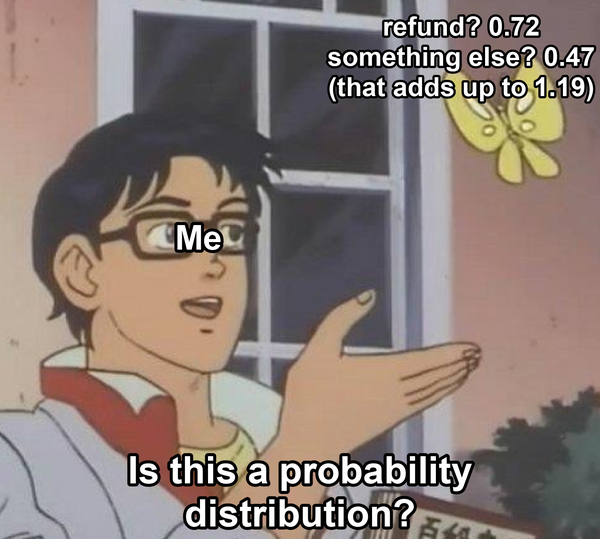
A question and its opposite don’t have to add up. TypeSafe shows this on a ticket that said “I was charged twice for the same order”. Asked “Is the customer asking for a refund?”, Jev said 0.72. Asked the opposite, “Is the customer asking for something other than a refund?”, it said 0.47. You’d expect the two to add up to 1, but they add up to 1.19. So ask each question the way you mean it, and don’t work out one answer from the other.
It’s not a calculator. Jev doesn’t count reliably and reads dates as text. So “Is the refund above ₹50,000?” or “Was this raised more than a week ago?” are jobs for code. Jev can help find the date in a messy message, but the comparison belongs in code.
Too much text makes it worse. Accuracy drops when the input is full of things that have nothing to do with the question. If you want to know about one message, send that message, not the whole Slack thread.
English works best. Other languages are “handled but not equally well”. In a small test on Indian languages, Jev got every question on clean text right, but missed a few very short replies, just two or three words in romanised Kannada, Marathi and similar languages. If your users write like that, test it first.
It can’t explain itself. Jev doesn’t generate text, so its answers never come with a “because”. If your users need the reasoning, you still need an LLM.
Notice the pattern. Almost every fix is the same. Keep the question small and direct, and move anything that needs working out into code.
BEYOND TICKETS
“Nothing here is a security boundary.” (TypeSafe docs, on its own injection filter)
Tickets are just one example. TypeSafe’s own list of example use cases sorts the jobs Jev can do by the shape of the decision.
| Decision shape | Reach for it when | Examples |
|---|---|---|
| Classification | One known category should win | Intent, topic, department |
| Detection | You need the probability that something is present | Spam, fraud, urgency, jailbreaks |
| Scoring | The answer belongs on an ordered scale | Severity, relevance, quality |
| Routing | A category picks the next code path | Tool use, escalation, support queues |
| Ranking | Items need ordering by relevance or quality | Search results, recommendations |
| Verification | Something must be checked for known failure modes | Citation support, policy violations, errors in tool calls |
The two uses I saw most often in other people’s projects are code review and guardrails.
In code review, Jev works well as a first pass. Some projects, like DiffJury, use Jev to score how risky a change is and give a quick verdict. Clean Code Review goes a step further. Jev checks every file against questions based on the book Clean Code, and then an LLM writes the review from those answers. Either way, Jev doesn’t replace the reviewer. It points at things cheaply, so a person or an LLM knows where to look first.
Guardrails are where speed matters most. A guard that takes two seconds per check is tempting to switch off, while a fast one can check every single tool call. But being fast doesn’t make it smarter. A Jev moderation plugin for Mastra did at least as well as Mastra’s own LLM moderation on 58 messages, in 0.4 seconds instead of 2. And no threshold will catch a model that’s confidently wrong. In one reported test, a gate let through a command that wipes the whole disk, because a fake model used for testing (not Jev) said “allow” with 0.97 confidence, even though the gate’s own check had flagged it as “recursive force delete”.
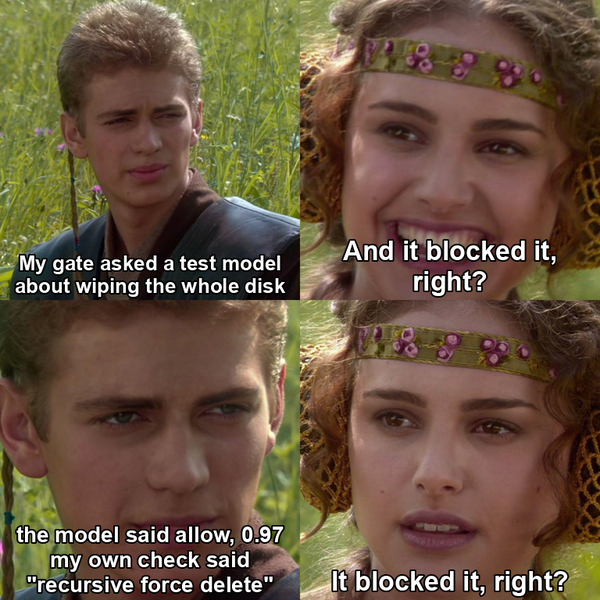
That’s why hard rules belong in code, where they run before any model sees the command. Keep content fetched from the web or from files out of the guard’s input, too, because one planted sentence dropped Jev’s block probability from 0.76 to 0.48. Decide ahead of time what happens if the call fails, and run the guard in shadow mode first, just logging what it would have blocked. And keep your sandbox. In 2024, Cisco got 449 of 450 attack prompts past Meta’s Prompt Guard just by spacing out the letters and removing punctuation. Jev is a cheap extra layer, not a wall.
CAN JEV PICK THE MODEL?
There’s one more idea people try with Jev, and it sounds perfect. Let Jev decide which model handles each task, Haiku for the easy ones and Opus for the hard ones. In practice, it saves less than you’d hope.
The famous routing results, like RouteLLM and FrugalGPT, came from models whose prices were up to a hundred times apart. With Claude, Sonnet costs twice as much as Haiku, and Opus four times as much. On top of that, switching models throws away your prompt cache. An early version of one router project routed every request, main chat included, and ended up spending $19.53 more than its $87.19 baseline.

If you still want to try it, only pick the model once, when a new piece of work starts, like a new subagent. Make it easy to move up to a bigger model and hard to move down, and stick with your default whenever Jev isn’t sure. And before you switch models at all, try lowering the effort on the model you already have. Set it once when the work starts, though, because changing it in the middle of a conversation also resets the cache on most models.
If you want Jev in front of your models, TypeSafe’s own intent routing pattern is a better fit. There, Jev decides whether a request needs plain code (like a database lookup), a specialist LLM, or a person, instead of choosing between models that are only a few times apart in price.
BACK TO 2 + 2
Remember the coworker with the calculator? That’s what we’ve been doing with our agents, sending every small check to a model built for 17 × 24. A lot of those checks were 2 + 2 all along.
If I had to sum up this post in one idea, it isn’t really Jev versus LLMs. It’s about knowing which kind of question you’re asking. If the answer follows directly from the input, it’s a System 1 question, and a fast model like Jev can answer it in one call, with a probability you can check. If you need one result to get the next, it’s a System 2 question, and it belongs in code or with a model that can think it through. Your code decides which is which, and when an unsure answer deserves a second look. That’s the job Kahneman’s System 2 is too lazy to do, and software can do it every single time.
If you want to try this, start small. Pick the most boring check in your agent. “Does this ticket have steps to reproduce?” is a good one. Label a hundred real examples, run Jev next to your current model in shadow mode for a week, and compare them. You’ll quickly find out whether that check was 2 + 2.
At the time of writing, Jev is only ten days old, and so is most of what I’ve cited here, so some of it will change fast. Treat this post the way you’d treat a quick answer from System 1. It’s a good first guess, but worth checking.
Save your System 2 for the problems that really need it.